

Advanced Download Manager
14.0.39 by admtorrent (0 Reviews) November 15, 2025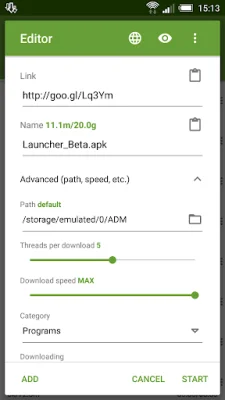
Latest Version
14.0.39
November 15, 2025
admtorrent
Tools
Android
0
Free
com.dv.adm
Report a Problem
More About Advanced Download Manager
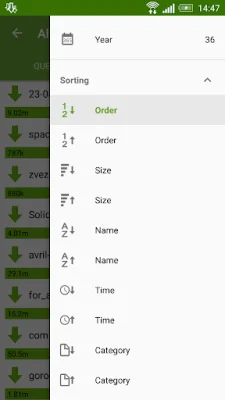
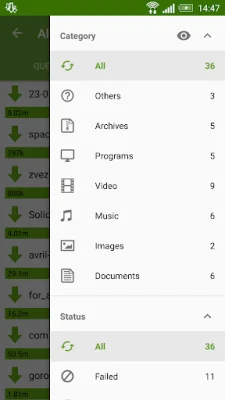
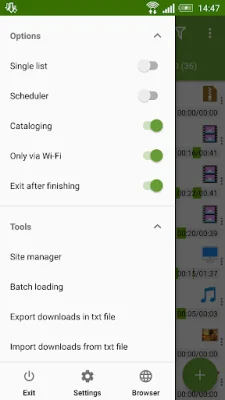
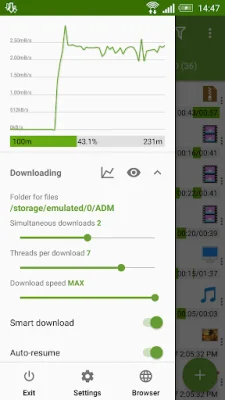
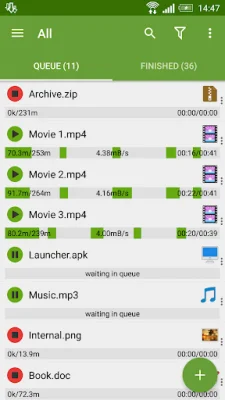
This application is a download manager for Android devices that allows users to download up to five files simultaneously from the internet. It uses multithreading with 16 parts to accelerate the downloading process. It can also intercept links from Android browsers and the clipboard, making it easy to add new downloads. The app can download files in the background and resume after a failure, and it has a special loader for images, documents, archives, and programs. It also has a smart algorithm that increases the speed of downloading. One of the unique features of this app is that it only allows downloading through Wi-Fi, ensuring that users do not use up their mobile data. It also has a boost downloader for 2G, 3G, and 4G networks, and users can change the maximum speed in real-time. The app also functions as a video and music downloader, and it can resume interrupted downloads. It supports files larger than 2 gigabytes and can parallel download files in a queue. The app also has a torrent downloader feature, which allows users to add torrents and magnets through various methods such as the editor, clipboard, browser, and file explorer. Users can select the necessary files and folders, view their size and type, search by name, and sort them. The app also has a Right Menu for filtering torrents and seeding, and a Left Menu for quick options. In the Settings section, there is a new Torrent category with various options. The Properties window displays information about the torrent, and the Site Manager supports profiles for them. The Advanced Settings of the app allow users to customize the interface and themes, select the folder for downloaded files, and set different automatic actions after finishing downloads. Users can also save different file types in different folders, create an empty file to accelerate downloading, and set the app to stop the process if the battery charge level is low. Other features include importing a list of links from a text file, auto-resuming after errors or a break in the connection, and planning the start of downloading at a specific time. The app has a clean and user-friendly interface with a light material design. Users can filter downloads by types and status, access quick options from the left menu, and use the context menu for easy management. Downloads can be sorted by order, size, and name, and completed files can be opened through favorite apps. The app also provides information about the downloading process, such as speed, size, and time. Users can pause, resume, and restart downloads, create advanced profiles for sites, and fine-tune each download. There is also a widget available for the home screen. The app also has extended notifications, with an icon displaying the progress and speed in the notification panel. There is also a transparent progress bar that appears on top of all windows, and users can receive a completion notification through sound and vibration. ADM also has a built-in browser with support for multiple tabs, advanced media downloading, a list of history and bookmarks, and the option to easily send a file to the downloader. It also has a download accelerator for social networking and an option to change the "User-Agent" for forging the browser. The app has a simple control system for downloads, where users can press on a download to start or stop the process, and long-press on a completed download to open the file. There is also an option to long-press on a link and select ADM Editor from the "Complete action using" window, or use the "Share" or "Send" option to send the link to ADM Editor. Users can also copy a link and paste it into the app using the "Add" button. In conclusion, ADM is a comprehensive and efficient download manager for Android devices. It offers a range of features such as simultaneous downloading, multithreading, interception of links, background downloading, and support for various file types and sizes. Its clean interface, extended notifications, and built-in browser make it a user-friendly and convenient app for managing downloads.
Rate the App














Popular Apps









