

Assistive Touch Easy Touch
3.7 by Parthkumar Patel (0 Reviews) September 18, 2024


Latest Version
3.7
September 18, 2024
Parthkumar Patel
Tools
Android
0
Free
com.tothetrends.assistivetouch
Report a Problem
More About Assistive Touch Easy Touch
Assistive Touch Easy Touch is an application designed to help users protect their mobile device's physical buttons, such as volume and home screen buttons. This is especially useful for those with larger screens, those who prefer to use their phone with one hand, or those with broken physical buttons. The app allows users to set up one-click or double-click actions to replace pressing buttons.
The app requires certain permissions, including access to the camera, phone state, device administrator, and the ability to draw over the screen. For devices with Android version 9.0 or below, the app also requires device manager permissions to use the lock screen feature in the control panel.
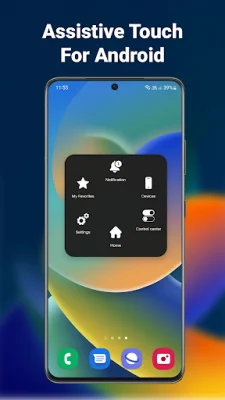
The control panel of the Assistive Touch Android app provides various options and parameters, similar to the iOS 16 phone control panel. Users can set up one-click shortcuts to access any application, making it easily accessible from the home screen. The app also offers features such as adjusting volume, locking the screen, using multi-finger gestures, restarting the device, and replacing button presses with a tap.
To activate the assistive touch button, users simply need to turn it on in the app. The button will then appear on the screen and can be dragged to any edge, such as the top, bottom, left, or right. It will remain in a light color until moved or activated. Users can set up single-click, double-click, or long-press events for the button.
The main purpose of the assistive touch menu is to provide quick access to various settings and functions. It can be added to the Accessibility Shortcut for easy access from the Control Center, or users can use the side or home button as the easy touch button.
The app also offers quick touch setting features, such as changing settings, adjusting volume with a virtual button, taking screenshots, and opening notifications. Users can also change WiFi and Bluetooth states, ring mode, screen rotation, volume, airplane mode, and flashlight brightness. Additionally, the app allows users to launch all applications or games on their device with just one click.
The assistive touch easy touch button for Android offers customizable features for the control panel. Users can change the color, background, button size, and position of each function within the app. They can also choose from a variety of colors and icons, including cute and animated options. Thank you for using our product and for your support! We strive to provide original and SEO-oriented content.
Rate the App















Popular Apps









