
Bluetooth Radar Trial
1.3.2 by FruitMobile (0 Reviews) September 18, 2024

Latest Version
1.3.2
September 18, 2024
FruitMobile
Tools
Android
0
Free
com.fruitmobile.bluetoothradar.trial
Report a Problem
More About Bluetooth Radar Trial
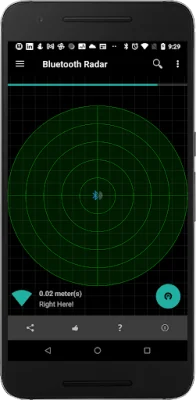
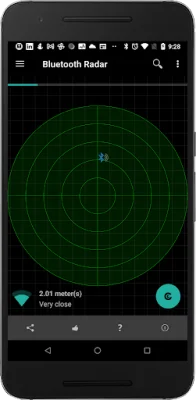
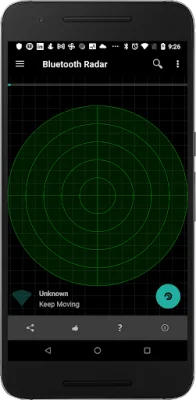
If you're tired of constantly losing your fitness accessories or other Bluetooth devices, then the Fruitmobile 'Bluetooth Radar' app is the perfect solution for you. This easy-to-use app utilizes Bluetooth technology to track the position of your lost device on a radar, updating its location every second. Whether you're moving towards or away from the device, the app will show you in real-time.
One of the best features of this app is that it does not require root access on your device. The only permissions needed are for Bluetooth and location, with any additional permissions being used for displaying ads. For Android Marshmallow users, location permission is necessary for finding devices. The paid version of the app only requires Bluetooth and location permissions.
The app has a variety of useful features, including the ability to find lost Bluetooth accessories or any other saved device. It can also detect all beacons in your vicinity, such as EddyStone, iBeacon, or alt beacon. You can even see the URLs advertised by EddyStone beacons and get full details on other types of EddyStone beacons like TLM or Uid. By tapping on each device on the radar, you can access all the details about it and even connect to it to see the services running on it.
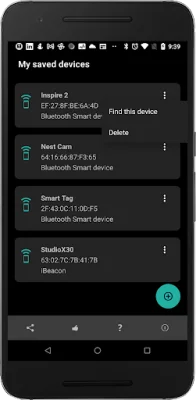
To make things even more convenient, you can save your favorite devices on the app so that they can be easily found if lost. This feature is especially helpful for frequently misplaced items. For more information on the app, including screenshots, you can visit the website at http://www.fruitmobile.com/bt_radar.html. If you have any questions, suggestions, or feature requests, you can contact the support team at [email protected].
Some common questions about the app are also addressed in the FAQ section. For example, it is recommended to save all your devices on the app so that they can be easily found later. If you have lost your Fitbit, you can use the app to find it by going to the menu and selecting "Find a Device." From there, you can choose your device from the saved devices list and move around in the area where you think you may have misplaced it. The app will show the device on the radar if it is within range, and you can move around until it is in the center of the radar. With its user-friendly interface and helpful features, the Fruitmobile 'Bluetooth Radar' app is a must-have for anyone who frequently misplaces their Bluetooth devices.
Rate the App











Popular Apps









