

Bluetooth Terminal HC-05
1.20 by mightyIT (0 Reviews) August 15, 2024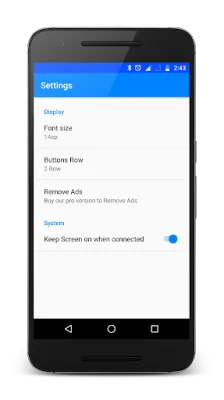



Latest Version
1.20
August 15, 2024
mightyIT
Communication
Android
0
Free
project.bluetoothterminal
Report a Problem
More About Bluetooth Terminal HC-05
This app is a unique and one-of-a-kind application that allows you to have compatibility with all microcontrollers. All you need is a HC-05 serial adapter connection with the serial ports of the controllers. This means that you can control any microcontroller that uses a Bluetooth Module HC 05 or HC 06 through your smartphone. This app is perfect for those who are working with hardware and need an easy way to debug any problems that may arise.
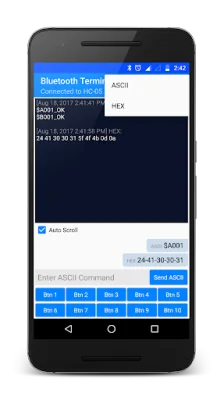
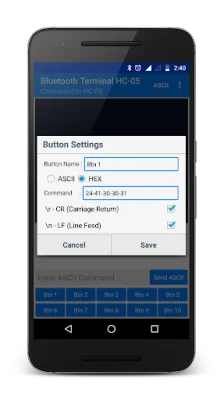
The app has several features that make it user-friendly and efficient. It has separate panels for sending and receiving data, making it easy to keep track of the information being transmitted. You can also customize your own buttons for frequent sending of the same data, saving you time and effort. The app also allows you to monitor receiving data in either HEX or ASCII format, and you can choose to send data in either ASCII or HEX format. Additionally, there is an option to add \r \n at the end of sending data, which can be changed by long pressing on a particular button.
One of the most convenient features of this app is the simple copy option for sent data. By long pressing on the data, you can easily copy it and use it for other purposes. The app also has a send log file for both received and sent data, allowing you to keep track of all the information being transmitted. You also have the option to keep the screen on or off while using the app, depending on your preference. And for those who want an uninterrupted experience, there is an ad-free version of the app available for purchase.
It is important to note that the default setting for received data is in ASCII format, but this can be changed from the top menu. Similarly, the default setting for sent data is also in ASCII format, but this can be changed by long pressing on a particular button. And finally, the default setting for \r\n being sent with every data can also be changed by long pressing on a particular button. This app is not only user-friendly and efficient, but it also allows for customization and flexibility to suit your needs. So why wait? Download the app now and make your microcontroller projects even easier!
Rate the App















Popular Apps









