

Email & Calendar for Hotmail a
1.0.8 by BlueBird apps (0 Reviews) July 31, 2024




Latest Version
1.0.8
July 31, 2024
BlueBird apps
Communication
Android
0
Free
com.bluebirdmail.mailcalendarforhotmailandoutlook
Report a Problem
More About Email & Calendar for Hotmail a
This app, called BlueBird for Hotmail and Outlook, is designed to help users manage their email inbox more efficiently. It offers a variety of features that make it stand out from other email apps, making it a great choice for those who use Hotmail or Outlook as their primary email service.
One of the main reasons to use this app is its ability to clean up your inbox by grouping emails into conversations. This means that all emails related to a specific topic or thread will be grouped together, making it easier to find and manage them. This feature can save users a lot of time and frustration, especially if they receive a high volume of emails.
In addition to organizing your inbox, BlueBird also offers smart synchronization, which helps save space and battery on your device. This is especially useful for those who have limited storage space or are concerned about their device's battery life. The app also offers a fingerprint and PIN-code login option for added security, as well as a day and night mode for customizable viewing.
Other notable features include avatars for messages, a focused inbox to prioritize important emails, and a fantastic search function with smart filters. The app is also compatible with both phones and tablets, making it convenient for users to access their emails on any device. Swipe gestures can be used to manage emails in the inbox, and a "do not disturb" mode is available for those who want to limit notifications from Hotmail and Outlook.
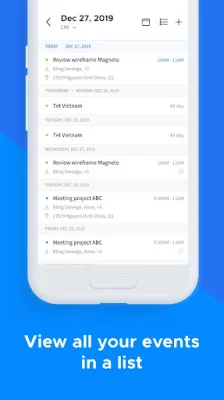
BlueBird also offers advanced calendar features, allowing users to customize their calendar and choose from different views such as list, day, week, or month. Home screen widgets are available for both the calendar and inbox, and users can select which accounts they want to display. The app is compatible with both Hotmail and Outlook accounts, making it a versatile option for users who have multiple email addresses.
But that's not all - BlueBird also offers integration with Android Smartwatches, adjustable font sizes, custom signatures for each email account, the ability to mute notifications for specific email threads, and the option to schedule email reminders. Users can also view all their Hotmail, Outlook, and local contacts within the app. It's important to note that this app is not affiliated with Hotmail or Outlook, but is an independent app designed to help users manage their emails on-the-go. With its various features and user-friendly interface, BlueBird for Hotmail and Outlook is a great choice for those looking for an efficient and customizable email app.
Rate the App















Popular Apps









