

Millennium bim Smart IZI
4.10.2 by Millennium bim (0 Reviews) December 15, 2025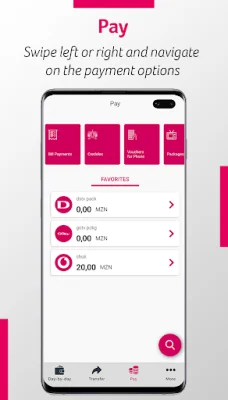
Latest Version
4.10.2
December 15, 2025
Millennium bim
Finance
Android
0
Free
com.ebankit.android.millenniumbim
Report a Problem
More About Millennium bim Smart IZI
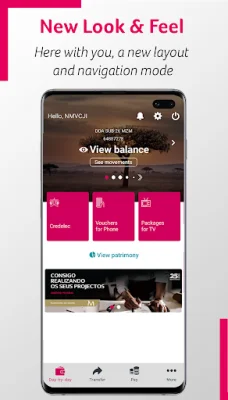
The new version of Smart IZI offers a fresh and modern Look and Feel, with updated colors, layouts, menus, and buttons. The Smart IZI layout has been redesigned for easier navigation, allowing users to slide left or right on the products carousel to view all their accounts, cards, savings, and loans. The new version also features a fixed navigation bar at the bottom of the screen for quick access to popular features such as "day-by-day", "transfer", "pay", and "more".
Privacy is a top priority in the new version of Smart IZI, with the introduction of a Privacy mode that allows users to choose whether to hide their account balances after authentication. This ensures a higher level of confidentiality for financial information.
The app has also been simplified for a more user-friendly experience, with quick navigation options in the top right corner of the "day-by-day" feature for alerts, settings, and exiting the app. Additionally, the app now has the ability to distinguish between different user segments and customize the visual components accordingly.
Stay informed about your finances and bank news with the new Alerts and Push Notifications feature. Users can easily access and enable these notifications in the settings section of the app. The settings section also allows for managing favorites, viewing authorization codes, changing the IZI PIN, registering/updating email, resetting internet banking password, and enabling/disabling biometric configuration.
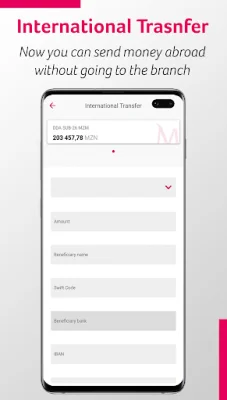
The products carousel allows for easy navigation and specific operations for each product, including checking movements, balances, and details. The transfer feature is also easily accessible in the navigation bar and offers various options such as intrabank transfers, interbank transfers, and mobile transfers.
For quick and convenient payments, simply click on the "Pay" option in the navigation bar. This feature allows for payments such as Credelec, phone vouchers, TV packages, bill payments, and more. The "More" section offers additional operations such as reading and generating QR codes, savings, IZI withdrawals, requesting checkbooks, and sending invitations (for Prestige Customers only). Users can also access contacts, branches, and current exchange rates in this section.
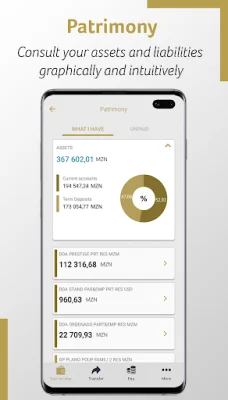
View your assets and liabilities in a graphic and intuitive way with the Patrimony feature, located below the product carousel. Save time by adding frequently used transactions as favorites for easy access in the future. Smart IZI can be accessed on any device with the app installed, using mobile banking credentials such as the cell phone number associated with the channel and the 4-digit access PIN, known as IZI PIN.
Experience the convenience and modernity of Smart IZI, brought to you by Millennium bim. With its user-friendly design and advanced features, Smart IZI is the perfect tool for managing your finances on the go. Stay connected and in control with Smart IZI. Aqui Consigo.
Rate the App















Popular Apps









