

Portable Wi-Fi hotspot Free
1.2.5.4-12 by CORE TECHNOLOGY (0 Reviews) October 30, 2024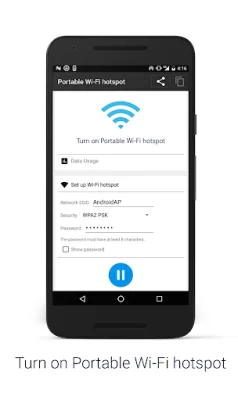
Latest Version
1.2.5.4-12
October 30, 2024
CORE TECHNOLOGY
Communication
Android
0
Free
kr.co.core_technology.hotspot_manager
Report a Problem
More About Portable Wi-Fi hotspot Free
This application aims to enhance your experience with mobile computing by providing a simple and fast solution. Before using the application, some initial configuration is required. This can be done by going to the Settings menu and selecting "More.." followed by "Tethering & portable hotspot" and then "Set up Wi-Fi hotspot". This will allow you to set up a Wi-Fi hotspot on your device, which can then be used to connect other devices to the internet.
Once the Wi-Fi hotspot is set up, you have the option to rename it or secure it for added protection. This can be done by going to Settings > Wireless & networks > More > Tethering & portable hotspot and then selecting "Configure Wi-Fi hotspot". From there, you can change the name of your Wi-Fi network and choose security options to ensure that only authorized devices can connect to it.
To use the application, simply touch the Play button to turn the Wi-Fi hotspot on or off. This makes it easy and convenient to use whenever you need it. However, it is important to note that in order to use this application, you must have a smartphone data plan from your telecommunication provider. This is necessary for users of some telecommunication firms, so be sure to check with your provider before using the application.
In summary, this application is designed to improve your mobile computing experience by providing a simple and fast solution for setting up a Wi-Fi hotspot on your device. With the ability to rename and secure the hotspot, you can ensure that your internet connection is safe and secure. And with the easy on/off function, you can use the hotspot whenever you need it. Just make sure to have a smartphone data plan before using the application. So why wait? Enhance your mobile computing experience today with this convenient and user-friendly application.
Rate the App















Popular Apps









