

Synovus Gateway Mobile
25.6.0 by Synovus Bank (0 Reviews) March 30, 2026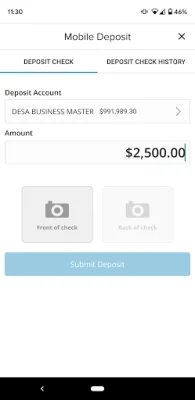
Latest Version
25.6.0
March 30, 2026
Synovus Bank
Finance
Android
0
Free
synovusfinancialcorp4228.mobile.preproduction
Report a Problem
More About Synovus Gateway Mobile
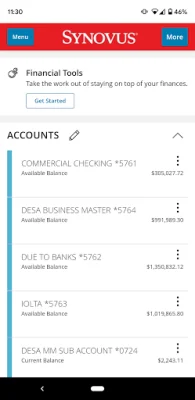
The Synovus Gateway Mobile Banking app is a convenient and secure way for businesses to manage their finances. It offers a variety of service modules, including accounts and transactions, information reporting, mobile deposit, user and policy management, statements, alerts, business bill pay, and more. With this app, businesses can have a single point of control for all their banking needs.
The app requires certain permissions to function properly. These include location permissions for displaying nearby Synovus locations and ATMs, camera permissions for using the mobile deposit feature and scanning Zelle® QR codes, and internet access permissions for connecting with the app. The minimum system requirement for the app is Android 9 or higher. Additionally, access to device contacts and photos is required for using Zelle®.
The Digital Privacy Statement explains how the app collects, shares, and uses user information. This can be found at https://www.synovus.com/internet-privacy-statement/. The app is free to download, but usage may incur charges from the user's mobile service provider. To use the app, businesses must be enrolled in Synovus Gateway and have established login credentials. Registration is required and access must be enabled by the company administrator.
Some features of the app, such as ACH, wire transfers, and positive pay, may require separate approval, agreements, fees, and/or additional balances. Enrollment is also required for features like business bill pay, Zelle®, external account aggregation, and financial management tools. The service marks and trademarks used in the app belong to their respective owners.
In summary, the Synovus Gateway Mobile Banking app is a comprehensive and user-friendly tool for businesses to manage their finances. It offers a range of features and requires certain permissions and enrollment for full functionality. The app is free to download and use, but additional charges may apply from the user's mobile service provider.
Rate the App












Popular Apps









