

WiFi Analyzer Pro
3.0.53 by FlagAppCompany (0 Reviews) September 20, 2024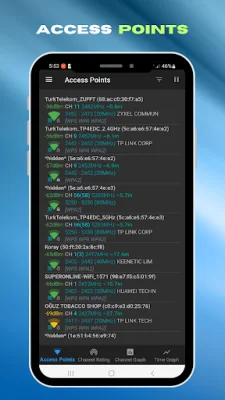



Latest Version
3.0.53
September 20, 2024
FlagAppCompany
Tools
Android
0
Free
com.fla.wifi
Report a Problem
More About WiFi Analyzer Pro
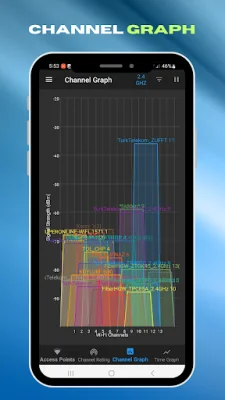
WiFi Analyzer Pro is an advanced application that allows you to thoroughly analyze all WiFi networks. It includes WiFi Channel Graphs, WiFi Access Points, and WiFi Time Graphs, making it the ultimate tool for analyzing and optimizing your WiFi connection. Whether you're a tech-savvy user or just looking to improve your WiFi experience, WiFi Analyzer Pro has everything you need.
With WiFi Analyzer Pro, you can easily identify nearby Access Points and view their signal strength on a graph. You can also track the signal strength of specific Access Points over time, giving you a better understanding of your network's performance. The app also allows you to rate channels and detect HT/VHT frequencies, providing even more detailed analysis.
One of the standout features of WiFi Analyzer Pro is its ability to analyze WiFi networks on multiple bands, including 2.4 GHz, 5 GHz, and 6 GHz (requires hardware support). This allows you to get a comprehensive view of your network and make informed decisions about optimizing your connection. The app also offers a complete or compact view of Access Points, estimated distance to them, and the option to export their details.
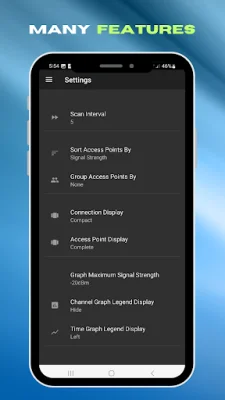
WiFi Analyzer Pro also offers a variety of useful features, such as the ability to pause and resume scanning, apply filters based on WiFi band, signal strength, security, and SSID, and even lookup vendor information through the OUI database. The app also offers a choice of dark, light, or system themes to suit your preferences.
For those looking for tips on how to make the most of WiFi Analyzer Pro, the app offers usage tips, such as tapping the title bar to switch between WiFi bands and understanding the security codes for different types of Access Points. It also provides information on WiFi standards and their compatibility with different Android operating systems.
In summary, WiFi Analyzer Pro is a comprehensive and powerful tool for analyzing and optimizing WiFi networks. With its wide range of features and user-friendly interface, it is the go-to app for anyone looking to improve their WiFi experience. So why settle for a mediocre connection when you can have the best with WiFi Analyzer Pro?
Rate the App















Popular Apps









