

AI Browser - Easy Automation
by Feofast (0 Reviews) December 06, 2025




Latest Version
December 06, 2025
Feofast
Tools
Android
0
Free
surf.aiagent
Report a Problem
More About AI Browser - Easy Automation
An AI Browser is a web browser that has the ability to automate tasks through the use of artificial intelligence. This means that instead of manually clicking buttons and filling out forms, you can simply write a short prompt of what you want to do and the AI Browser will analyze it and generate a sequence of actions to complete the task. This can save you time and effort, making your work more efficient and streamlined.
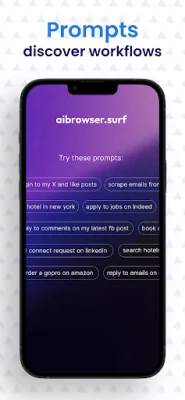
The possibilities of what you can do with AI Browser are endless. You can use it to bulk apply to jobs, order items from Amazon, send connection requests on LinkedIn, auto reply to emails, and much more. This makes it a valuable tool for marketers, operations teams, founders, or anyone who wants to automate web-based tasks such as data entry, scraping, monitoring, or form submissions.
Some of the key features of AI Browser include the ability to automate tasks with just prompts, a Live View feature that allows you to watch the browser agent work in real-time, the ability to schedule tasks to run hourly, daily, or weekly, and the option to use templates for popular use cases. This makes it easy for anyone to use, even without extensive technical knowledge.
One of the great things about AI Browser is that it adapts to layout changes without breaking the workflow. This means that even if a website changes its design, the AI Browser will still be able to complete the task without any issues. Additionally, there is no need to juggle with APIs, as all you need to do is write a simple prompt, click run, and watch the magic happen.
Some examples of what you can do with AI Browser include moderating a Reddit community by automatically filtering content and enforcing rules, scheduling and publishing posts across social media platforms, generating leads by scanning LinkedIn or the web for prospects, conducting deep research on any given topic with reliable sources, and automating social media accounts like Twitter or Facebook.
If you're interested in trying out AI Browser, you can do so for free. And if you have any feedback or queries, you can contact the team at [email protected]. They encourage you to be original and SEO-oriented in your communication with them.
Rate the App















Popular Apps









