

All Call Recorder
2.8 by Starbox (0 Reviews) July 29, 2024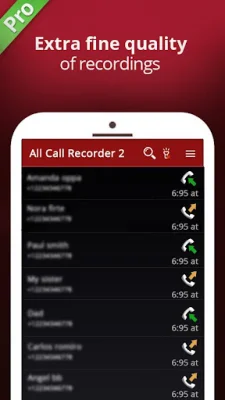
Latest Version
2.8
July 29, 2024
Starbox
Tools
Android
0
Free
com.starbox.callrecorder
Report a Problem
More About All Call Recorder
Call Recorder is a must-have utility for anyone who wants to easily record their phone conversations. With this app, you can quickly open it and start recording a conversation with one or more people. This is especially useful if the conversation becomes interesting and you want to save it for later. You can also set which calls are recorded and which are ignored, making it easy to filter out unwanted recordings.
One of the great features of Call Recorder is that you can listen to your recordings, add notes, and even share them with others. The app also syncs your recordings to the cloud, so you can access them from anywhere. This is perfect for those who need to keep track of important conversations and never want to forget the details.
Call Recorder allows you to create a library of conversations that are stored in a list and calendar format. This makes it easy to organize and find specific recordings when you need them. The app is also designed to be simple and user-friendly, with a clever interface that is easy to navigate.
We understand that recording calls can be a sensitive issue, which is why we have built Call Recorder to be a reliable and versatile utility. You won't have to worry about fumbling with complicated settings or questioning how to start recording. It's as easy as opening the app and making or receiving a call.
Call Recorder effectively records every detail of the conversation from both sides and saves the files in .caf format. You can then transfer these files to any device that supports .caf format and take them with you wherever you go. The app also has a Mini view feature, which allows you to control and monitor your live recordings without taking up too much space on your screen.
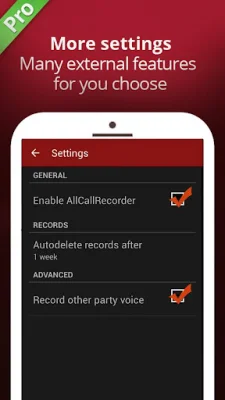
Some of the great features of Call Recorder Automatic include the ability to save only important recordings, high-quality audio, and customizable recording options. You can also use the shake and call record functionality for added convenience.
To use Call Recorder, simply open the app and let it run in the background. When you make or receive a call, the app will automatically start recording. You can then access your recordings and play them back at any time. However, please note that some devices may not be compatible with the app or may not allow call recording. If you encounter any issues, please try restarting your device or changing the recording settings.
Overall, Call Recorder Automatic is a reliable and user-friendly app that makes it easy to record and manage your phone conversations. With its various features and customizable options, it's a must-have for anyone who wants to keep track of important conversations. Just remember to follow the troubleshooting tips if you encounter any issues, and enjoy the convenience of having all your recordings in one place.
Rate the App















Popular Apps









