

Assistive Touch for Android
1.4 by Launcher Studio (0 Reviews) December 08, 2025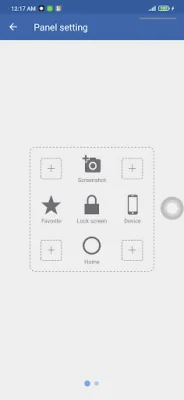




Latest Version
1.4
December 08, 2025
Launcher Studio
Tools
Android
0
Free
com.easytouch.assistivetouchpro
Report a Problem
More About Assistive Touch for Android
Assistive Touch is a free and user-friendly touch tool designed for Android devices. It offers a fast and smooth experience for its users. Once activated, the Assistive Touch menu will appear on your screen, which can be dragged to any edge for easy access. The app requires certain permissions to function properly. It uses Accessibility services to perform global actions such as going back, opening recent apps, and accessing notifications. These permissions are necessary and will only be used for the intended purposes. Similarly, the Device Administrator permission is needed for the feature that allows users to lock their device. This permission must be enabled before using the feature and can be easily uninstalled by clicking the "Uninstall" button within the app. To turn on Assistive Touch, simply open the app and switch on the enable item. For more actions, go to Settings > Accessibility > Services and turn on Assistive Touch. This will allow you to access your notifications, control features like Bluetooth and Wifi, take screenshots, and more. The Assistive Touch menu also provides easy access to your Home screen, Recent screen, and Back key. Simply tap on the corresponding action within the menu to use these features. Some additional features of Assistive Touch include the ability to customize the color of the menu and the size and color of the floating icon. If you need any support or have any questions, you can reach out to the app's support team via email. Thank you for choosing Assistive Touch for your device. We strive to provide a unique and SEO-oriented experience for our users.
Rate the App















Popular Apps









