
Business banking TB
1.7.2.6-prod by Tatra banka, a.s. (0 Reviews) October 10, 2024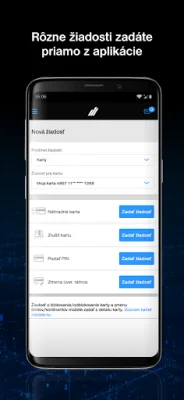
Latest Version
1.7.2.6-prod
October 10, 2024
Tatra banka, a.s.
Finance
Android
0
Free
sk.tb.businessbanking
Report a Problem
More About Business banking TB
The Business BankingTB mobile application is designed for clients who have activated Business BankingTB services. It offers the same features as the desktop version of Business BankingTB, making it convenient for users to manage their business accounts on-the-go.
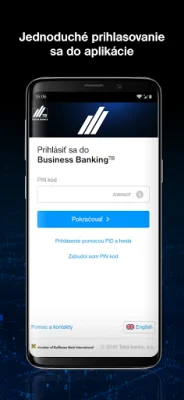
To use the application, an active internet connection is required, either through WiFi or data services provided by a mobile operator. The first time you log in, you will need to enter your PID and password, which are the same as the ones used for the desktop version. You will also need to confirm your login with a code generated by the ReaderTB mobile application. Alternatively, you can use a physical card and reader provided by Tatra banka for login. After the initial login, you can choose between two login options: using PID + password + ReaderTB or setting up a PIN code. The PIN code can only be used on the specific device it was set up on.
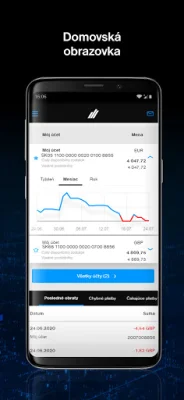
The homepage of the application displays a graph of your account balance and a list of the last five transactions. You can switch between accounts and the graph will update accordingly. Favorite accounts can be pinned to the top of the account list for easy access.
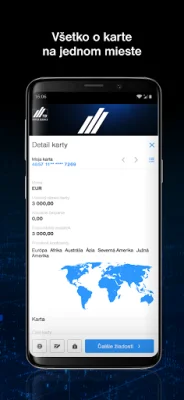
The card details section provides all the important information about your selected card, whether it is a credit or debit card. You can also make requests related to the card directly from this section.
The login page adapts to your chosen login method, with the option to use a PIN code for a quick and easy login. If you forget your PIN code, you can always log in using PID + password + ReaderTB.
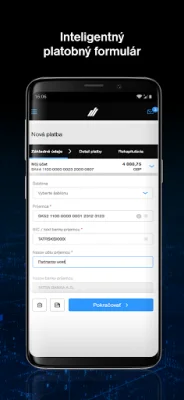
The application also offers a smart form for creating new payments, which automatically determines if the payment is a SEPA or foreign payment based on the entered data. Additionally, users can make various requests, such as for a new card or loan, without having to visit a bank branch.
The Business BankingTB mobile application is available in both Slovak and English. If you have any questions, ideas, or need assistance, you can contact us at [email protected]. We value originality and SEO optimization in our communication with clients.
Rate the App












Popular Apps









