

ChatsBack See Deleted Messages
1.2.0 by Wheatfield Guard Technology Co., Ltd. (0 Reviews) October 31, 2024

Latest Version
1.2.0
October 31, 2024
Wheatfield Guard Technology Co., Ltd.
Tools
Android
0
Free
com.imyfone.chatback
Report a Problem
More About ChatsBack See Deleted Messages
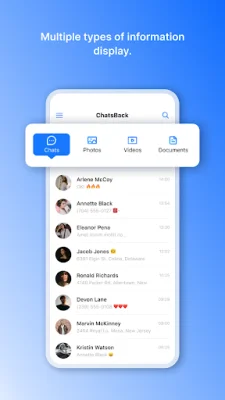
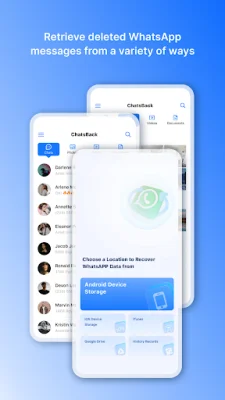
ChatsBack is a practical and simple application that allows users to retrieve deleted WhatsApp messages and attachments directly from various backups. This means that even if your friends have deleted messages or files from your conversations, you can still access them through this app. Additionally, ChatsBack allows you to view these deleted messages without the sender's knowledge, as well as read them without triggering the blue tick notification.
One of the main reasons to choose ChatsBack for WhatsApp message recovery is its practicality. With this app, you can recover deleted messages without needing a backup, including messages that have been retracted by your friends. This feature is especially useful for those who want to keep track of their conversations and don't want to miss out on any important information.
The interface of ChatsBack is designed to be simple and user-friendly, making it easy for anyone to use. The app also provides clear tutorials to guide you through the recovery process. Additionally, ChatsBack values the privacy of your WhatsApp data and ensures that it is kept confidential.
Using ChatsBack, you can conveniently download WhatsApp messages, including text, photos, videos, and GIFs, directly to your mobile phone. This allows you to view and re-share them with your friends at any time. The app also offers the option to recover WhatsApp data to your PC in various formats such as HTML, PDF, Excel, and CSV files.
If you're wondering how to read deleted WhatsApp messages that have been withdrawn by your friends, ChatsBack has got you covered. Simply install the app on your Android phone, agree to the necessary permissions, and start viewing your friends' data incognito. You can preview the recoverable WhatsApp data before performing the final recovery.
ChatsBack is constantly improving its functions and user experience, and is always looking to expand its possibilities. With this app, you no longer have to worry about missing out on important messages from your friends. Simply open ChatsBack and start a pleasant journey of watching your friends' messages incognito. For more information on how to use the app, you can refer to the guide on their website. Make sure to also check out their terms of service for more details.
Rate the App















Popular Apps









