

iOS PhoneDialer - iCallScreen
by Video & Photo Gallery (0 Reviews) November 08, 2025




Latest Version
November 08, 2025
Video & Photo Gallery
Tools
Android
0
Free
com.icall.dialer.icallscreen
Report a Problem
More About iOS PhoneDialer - iCallScreen
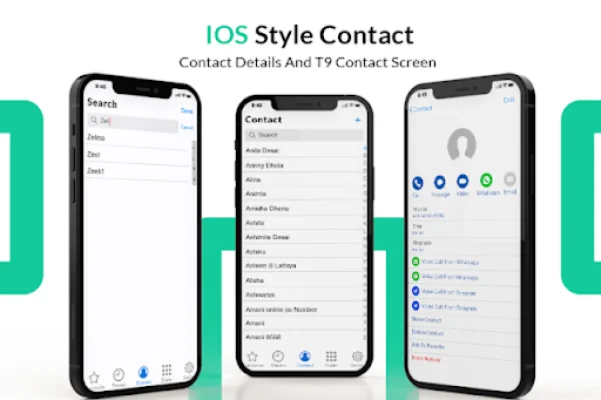
The Call Screen iOS 15 app is a new release that offers a variety of features to enhance your phone calling experience. It includes 14 different styles of caller screen themes, as well as a video ringtone and caller name announcer function. This app allows you to customize your caller screen with elegant color phone themes and also has a call blocker feature to help you avoid unwanted calls. With the caller id, call theme changer, call blocker, and video ringtone full screen options, you can easily personalize your call screen. The LED flashlight effect adds a creative touch to your incoming caller screen. The call blocker feature also allows you to block blacklisted numbers, providing added security for users. One unique feature of this app is the ability to block phone numbers, which is not commonly found in other similar apps. This feature allows you to choose who can call you, giving you more control over your incoming calls and maintaining your security. In addition to the caller screen customization options, the app also offers a variety of other features. You can set custom wallpapers and backgrounds for your call screen, as well as iPhone ringtones for each contact. The call block feature helps you avoid spam or unwanted calls, and the phone dialer allows you to easily manage your contacts and recent call history. The app also offers customization settings for wallpapers, ringtones, and call screen buttons. You can also enjoy the full range of features that the iOS 15 call screen provides, such as conference call management and a slide to answer button. The app is lightweight and supports dual SIM cards, making it convenient for users. Other features include a caller name announcer, fake call scheduling, flash on call, dark mode, and a call back screen for easy recall, messaging, blocking, or note-taking after a call. The app is also lightweight and has a user-friendly interface. It is available for download on any device and offers a custom dial pad experience.
Rate the App











Popular Apps









