

Metrobank Authenticator
1.6.0 by Metropolitan Bank & Trust Company (METROBANK) (0 Reviews) April 16, 2026
Latest Version
1.6.0
April 16, 2026
Metropolitan Bank & Trust Company (METROBANK)
Tools
Android
0
Free
com.metrobank.mfauthenticator
Report a Problem
More About Metrobank Authenticator
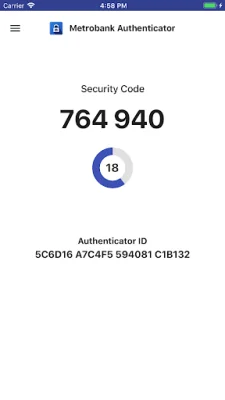
This application, called Metrobank Authenticator, allows users to generate a one-time use PIN code on their mobile device. This code is used in conjunction with the user's username and password to access Metrobank's Electronic Banking Channel and validate or authenticate transactions. This is done through Metrobank's Multi-Factor Authentication (MFA) service.
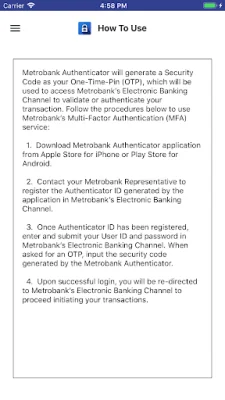
To use this service, the user must first download the Metrobank Authenticator application. They must then contact their Metrobank Representative to register the Authenticator ID generated by the application in Metrobank's Electronic Banking Channel. This step is necessary to ensure the security and accuracy of the authentication process.
Once the Authenticator ID has been registered, the user can proceed to log in to Metrobank's Electronic Banking Channel. They will need to enter and submit their User ID and password. When prompted for an OTP, they must input the security code generated by the Metrobank Authenticator. This code is unique and can only be used once, adding an extra layer of security to the transaction.
If the login is successful, the user will be redirected to Metrobank's Electronic Banking Channel to continue with their transactions. This process helps to ensure the safety and integrity of the user's financial information and transactions. It is important to follow these steps carefully to protect against fraud and unauthorized access to the user's account.
In summary, Metrobank Authenticator is a secure and convenient way to generate a one-time use PIN code for accessing Metrobank's Electronic Banking Channel. By following the necessary steps and using the unique security code, users can have peace of mind knowing that their transactions are protected and authenticated. This application is an essential tool for anyone who wants to securely manage their finances through Metrobank's Electronic Banking Channel.
Rate the App















Popular Apps









