

My Location Timeline on Map
1.0.8 by SM Infotech (0 Reviews) October 14, 2024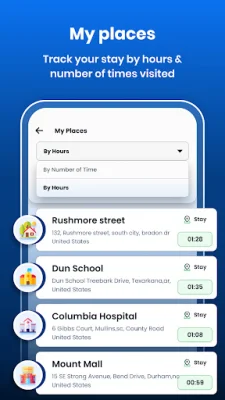
Latest Version
1.0.8
October 14, 2024
SM Infotech
Tools
Android
0
Free
com.sm.maptimeline
Report a Problem
More About My Location Timeline on Map
In today's fast-paced world, we often find ourselves traveling long distances and visiting multiple places in a single day. With so much going on, it can be easy to forget where we've been and when. That's where this app comes in - it allows you to save your travel timeline with all the important details of each location you visit. Whether you want to keep track of your daily travels or look back on a specific date and time, this app has got you covered.
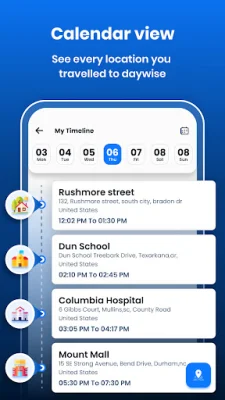
The app offers a variety of features to help you keep track of your travels. One of the key features is the ability to view a timeline of all the locations you've visited, complete with details such as the location, time, and duration of your visit. This makes it easy to see where you've been and when, without having to rely on your memory.
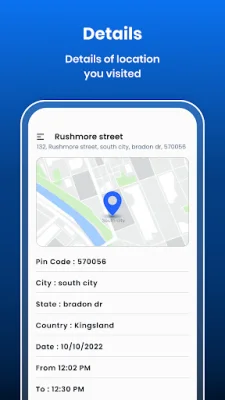
Another useful feature is the ability to track your location details with timings. This means you can see exactly when you were at a certain place, making it easier to plan your day or remember important events. You can also check your location history, which includes details such as the pincode, city, state, and country of each location you've visited.
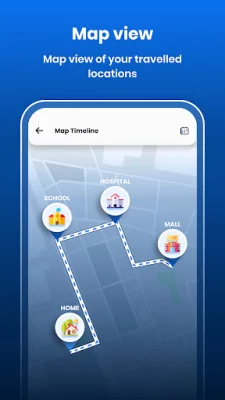
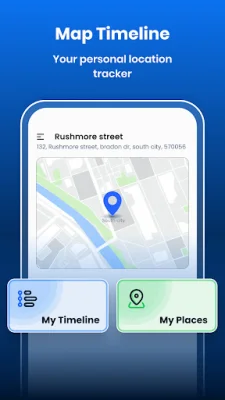
The app also offers a map view, where you can see the full route of your timeline. This is especially useful if you want to visualize your travels or see how far you've gone in a day. Additionally, you can view a list of your visited places, either by time or by hours. This allows you to see all the locations you've been to within a specific time frame, making it easier to organize your travels.
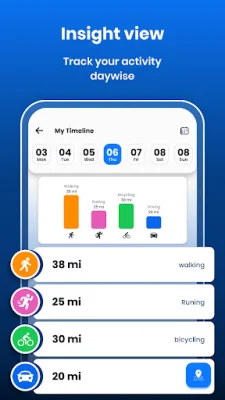
In order to use the app, you will need to grant location permission. This is necessary for the app to access your location and show your location history with a timeline. The app also uses physical activity permission to show your movement on the map timeline, such as walking, running, or cycling. This adds an extra layer of detail to your travel timeline and can help you see how you got from one destination to another.
Rate the App












Popular Apps









