

WiFi Analyzer & Scanner
1.1.0 by Yasiru Nayanajith (0 Reviews) April 28, 2026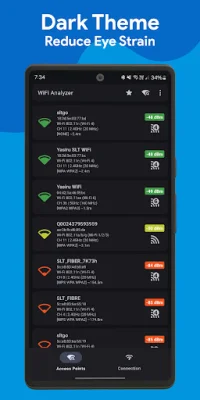
Latest Version
1.1.0
April 28, 2026
Yasiru Nayanajith
Tools
Android
0
Free
com.ytheekshana.wifianalyzer
Report a Problem
More About WiFi Analyzer & Scanner
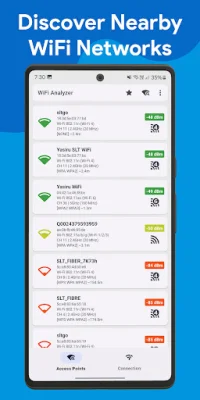
WiFi Analyzer is an Android application that allows users to scan nearby WiFi networks, analyze signal strength, discover connected devices, and optimize WiFi performance without needing root access. It is ideal for troubleshooting slow connections, finding the best WiFi channel, detecting network congestion, and improving wireless performance in various settings.
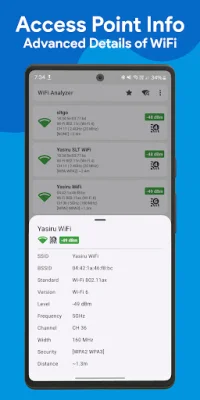
The app features a smart WiFi network scanning function that provides detailed insights on nearby networks, including SSID and BSSID identification, WiFi versions and standards, frequency bands, channel analysis, channel width support, and security types. It also allows for real-time monitoring of WiFi signal strength and estimates the distance to access points, making it easier to find the least congested channel and reduce interference for faster and more stable connections.
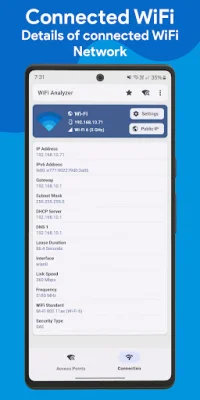
Users can also view complete information about their active connection, whether it is WiFi, mobile data, or Ethernet. This includes IP address, subnet mask, default gateway, DHCP server details, IP lease time, DNS servers, link speed, and connection status. The app also provides access to primary access point information, making it a useful tool for diagnosing connectivity issues and verifying network configuration.
Another key feature of WiFi Analyzer is its ability to detect all devices connected to the local network. This includes identifying devices by IP address and device name, monitoring unknown or unauthorized devices, and tracking connected devices in real-time. This feature is especially useful for improving WiFi and network security by knowing exactly who is connected to the network and identifying potential risks.
The app also boasts a range of other features, such as real-time WiFi analysis, signal strength monitoring, channel optimization, network diagnostics tools, and a modern Material Design 3 interface with a dark theme. It does not require root access and supports Android 7.0 and above.
WiFi Analyzer is perfect for a variety of purposes, including finding the best WiFi channel for a router, troubleshooting slow or unstable connections, detecting WiFi dead zones, identifying network congestion and interference, monitoring unknown devices, and optimizing WiFi for gaming and streaming. It is also a useful tool for IT professionals and network administrators.
What sets WiFi Analyzer apart from other basic WiFi apps is its professional-grade diagnostics. It offers full support for WiFi 6E and WiFi 7, advanced channel width analysis up to 160 MHz, accurate signal strength measurements, built-in local device discovery, and a modern Material Design 3 interface. Users can download the app now to scan, analyze, and optimize their WiFi networks with ease.
Rate the App















Popular Apps









