

AnkerWork
2.7.3 by Anker (0 Reviews) September 12, 2024
Latest Version
2.7.3
September 12, 2024
Anker
Tools
Android
0
Free
com.anker.ankerwork
Report a Problem
More About AnkerWork
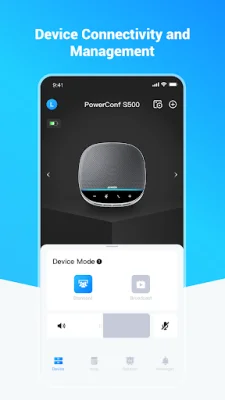
This app is designed to work with a variety of conference devices, including PowerConf, PowerConf S3, PowerConf S500, PowerConf H300, PowerConf H500, and PowerConf H700. It is a powerful tool that allows users to easily manage and control their conference calls and meetings. With this app, users can connect their devices to their smartphones or tablets and have full control over their conference settings and features.
One of the main features of this app is its ability to connect multiple devices to a single conference call. This means that users can have a seamless and efficient conference experience, even if they are not all in the same physical location. The app also allows for easy scheduling and joining of conference calls, making it a convenient tool for busy professionals.
Another key feature of this app is its advanced audio technology. It is designed to provide crystal clear sound quality, ensuring that all participants can hear and be heard clearly during the conference call. This is especially important for important business meetings or presentations where every word counts.
The app also offers a variety of customization options, allowing users to tailor their conference settings to their specific needs. This includes features such as call recording, mute/unmute options, and the ability to add or remove participants from the call. With these options, users can have full control over their conference calls and ensure a smooth and productive meeting.
In addition to its practical features, this app also has a user-friendly interface that makes it easy for anyone to use. Whether you are a tech-savvy professional or a beginner, you can easily navigate through the app and access all of its features. This makes it a valuable tool for businesses of all sizes, as it can be used by anyone in the organization to facilitate efficient and effective conference calls. Overall, this app is a must-have for anyone looking to enhance their conference calling experience and improve their productivity.
Rate the App















Popular Apps









