
Fiwalld non-root firewall
2.4.9 by L. Bean (0 Reviews) August 24, 2024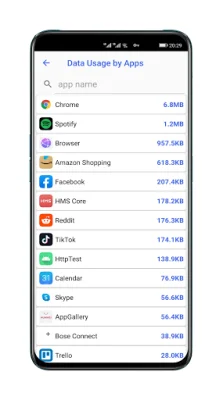
Latest Version
2.4.9
August 24, 2024
L. Bean
Tools
Android
0
Free
com.lazybean.vfiwalld
Report a Problem
More About Fiwalld non-root firewall
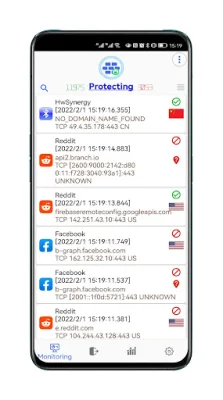
This application is a firewall that helps protect your device from malicious activity and unwanted connections. It has several key features that make it a powerful tool for keeping your device safe and secure. One of the main features is a real-time monitor that shows you which apps are accessing which servers or active sessions. This allows you to keep track of any suspicious activity and take action if necessary.
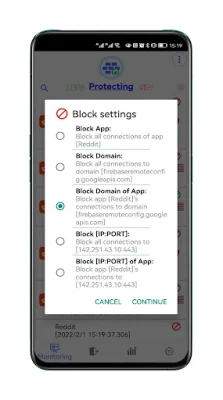
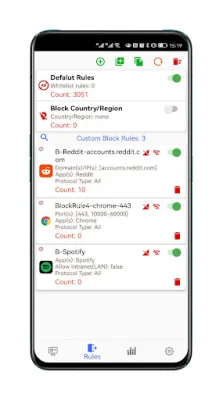
The default rules of this firewall are designed to strictly block advertisements, malwares, spams, spyware, trackers, and coinminers. This helps prevent your system from connecting to these potentially harmful sources. The interface of the app is user-friendly and makes it easy to add your own professional firewall rules with just a few clicks. For advanced users, there is also the option to add or batch provision custom firewall rules.
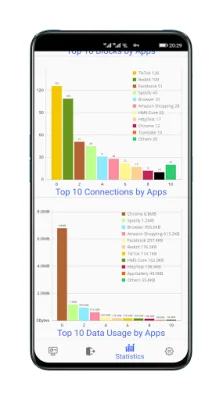
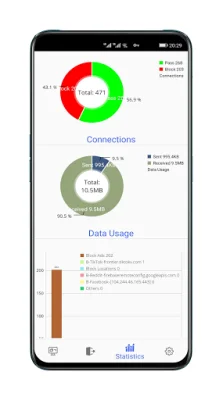
The app also offers multi-dimensional statistical analysis, which allows you to quickly identify any suspicious applications. This can help you stay on top of any potential threats and take action to protect your device. Additionally, the app provides predefined non-logging DoH/DNSCrypt servers for further protection of your privacy. You also have the option to add custom DoH/DNSCrypt or UDP DNS servers for even more control over your privacy and security.
Another useful feature of this firewall is the ability to batch provision whitelist rules. This allows you to easily add multiple rules at once, saving you time and effort. You can also check the location details of any IP addresses by clicking on the country flag, which opens an external map app. The app also supports a Default Block All Mode, IPv6 and IP stack mode selection, and "allow rules" under "default block mode".
If you receive a system prompt that Fiwalld is draining your battery, there is no need to panic. This is because Fiwalld is doing the connecting work, while other applications save this part of the battery, resulting in the overall battery consumption remaining the same. It is important to note that you cannot run Fiwalld and another VPN client at the same time, as this is a limitation of the Android system.
It is also important to address any concerns about the app being flagged as a Trojan by antivirus scanners. This is a "false positive" report, as the app contains a pure text file that includes a list of ads, trojan domains, and other potentially harmful sources that Fiwalld uses to block them. Some antivirus scanners, such as AVG, have already fixed this issue after testing the app. Fiwalld also strictly follows a Privacy Policy, which can be found at https://sites.google.com/view/fiwalld-privacy-policy. If you have any further concerns, you can contact the developer via [email protected].
In summary, this firewall app uses the Android VPN Service to route traffic to itself, allowing for on-device filtering instead of relying on a server. With its various features and customizable options, it is a powerful tool for keeping your device safe and secure from malicious activity and unwanted connections.
Rate the App















Popular Apps









