

FTP Server - Multiple users
0.15.19 by Banana Studio (0 Reviews) July 31, 2024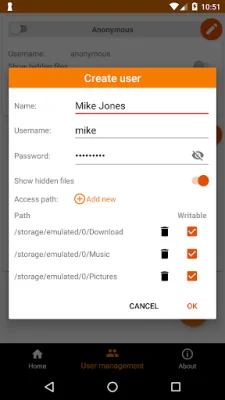
Latest Version
0.15.19
July 31, 2024
Banana Studio
Tools
Android
0
Free
net.xnano.android.ftpserver
Report a Problem
More About FTP Server - Multiple users
This application is a WiFi file transfer or wireless file management tool that allows you to transfer files without using a USB port, which can help prolong the lifetime of your device. It offers multiple features and is completely free to use, with the option to remove ads by accessing the "Remove Ads" section in the About screen.
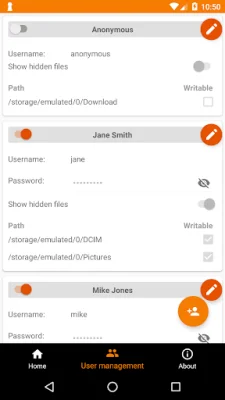
The application supports various network interfaces, including WiFi, Ethernet, and Tethering, and allows for multiple FTP users, including an anonymous user. Each user can be given access to hidden files and can have multiple access paths, such as internal storage or external SD card. The access can also be set to read-only or full write access. The application also supports simultaneous file transfers and can automatically open ports on your router, allowing you to access files from anywhere in the world.
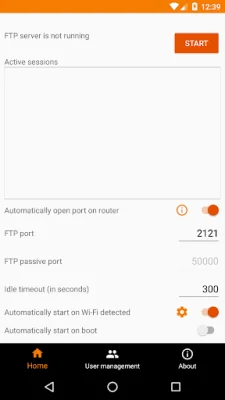
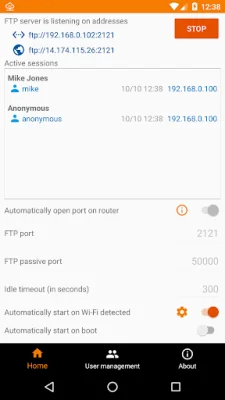
Additionally, the application can be set to automatically start the FTP server when a specific WiFi network is connected or on boot. It also supports scripting and Tasker integration, allowing for even more customization and automation. The user can manage server configurations, monitor connected clients, and enable automatic start on specific WiFi networks through the Home screen. The User Management screen allows for the management of users and their access paths.
The application is compatible with various FTP clients, including FileZilla, Windows Explorer, Finder, and Total Commander. It can also be accessed through web browsers in read-only mode. The range of passive ports is from the initial port (default 50000) to the next 128 ports if UPnP is enabled, or the next 256 ports if UPnP is disabled. From version 0.13.0, the initial port is 60000.
Some notices to keep in mind include the fact that the application may not work as expected if doze mode is activated, and the user must add the application to the white list in the device's settings. The application also requires certain permissions, such as WRITE_EXTERNAL_STORAGE, INTERNET, ACCESS_NETWORK_STATE, and ACCESS_WIFI_STATE, to function properly. For users on Android P and above, the application also requires location permissions to automatically start the server on WiFi connections.
If users encounter any problems or have feedback to improve the application, they can contact the support team via email. Negative comments do not help the developer solve any issues. The application also has a privacy policy that can be accessed through the provided link.
Rate the App















Popular Apps









