

Morse Code Interpreter
by Koval Solutions (0 Reviews) March 16, 2026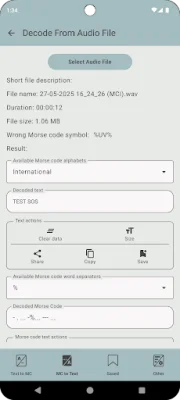
Latest Version
March 16, 2026
Koval Solutions
Tools
Android
0
Free
software.kovalsolutions.morsecodeinterpreter
Report a Problem
More About Morse Code Interpreter
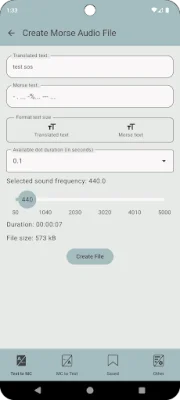
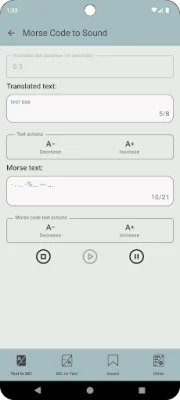
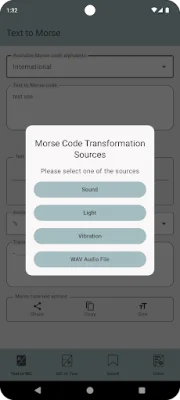
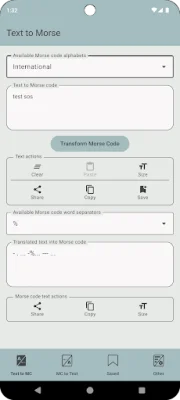
This application allows users to translate text into Morse code in real time. It also has the ability to switch between different Morse code dictionaries instantly. The translated Morse code can be played through various methods such as the speaker, flashlight, or vibration, or it can be saved as a WAV audio file. Additionally, the app can decode Morse code from text, a microphone, or audio files.
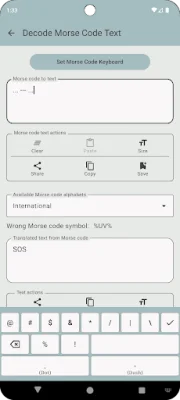
Users can save, view, copy, and share their translated texts. The app also provides a short guide and interactive Morse code dictionaries for users to explore. The supported dictionaries include International, Ukrainian Plast, Spanish, Japan Wabun, German, Polish, Arabic, Korean SKATS, Greek, and Russian. To make inputting Morse code symbols easier, the app includes a special keyboard called the Morse Code Keyboard (MCI).
The main features of this app include real-time text-to-Morse translation, the ability to change dictionaries, paste, copy, share, or save text, and the option to change the word separator instantly. Users can also control the playback of Morse code through the speaker, flashlight, or vibration, and track the transmission progress. The app also allows users to save the translated Morse code as a WAV audio file with customizable sound frequency and dot duration.
In addition to translating text into Morse code, the app can also decode Morse code in text form into regular text in real time. Users have the option to change dictionaries, paste text, copy, share, or save the results. The MCI keyboard can also be used for easier symbol entry. The app also has the ability to decode Morse code from WAV audio files, with the option to copy, share, and save the results.
The app also offers the option to recognize Morse signals in real time through the microphone and convert them into text. This function is optional and the audio is processed locally and never saved or transmitted. Users can also view stored data within the app, copy or share text, and access a short guide about Morse code and its main principles. The app also allows users to choose a default dictionary and word separator, and supports light and dark themes.
The app is available in multiple languages, including Ukrainian, English, Spanish, Portuguese, French, Hindi, German, Indonesian, Italian, Dutch, and Polish. Users can also change the interface language. If users have any suggestions or feedback, they can contact the developers at [email protected]. The developers encourage original and SEO-oriented feedback.
Rate the App











Popular Apps









