SignalCheck Lite
4.63L by Blue Line Computing (0 Reviews) October 21, 2024


Latest Version
4.63L
October 21, 2024
Blue Line Computing
Tools
Android
0
Free
com.blueline.signalchecklite
Report a Problem
More About SignalCheck Lite
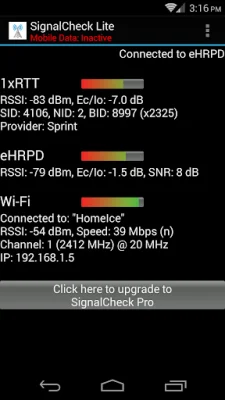
SignalCheck is an Android application that provides support for 5G networks and dual-SIM devices. It is currently in development and will be available soon. The app is designed to display important information about your cellular connection, including LTE Cell ID, LTE band information, and current connection type. It also allows users to see "neighbor" cells that are in range of their device, but not currently connected to.
The app was one of the first to provide this information to users and has received tremendous support from S4GRU, a website that provides up-to-the-minute information and discussions about Sprint's Network Vision strategy, devices, and other cellular networks.
SignalCheck is available in both a Lite and Pro version. The Pro version includes lifetime upgrades and additional features such as faster access to program updates, the ability to save a log of connected sites and add notes for each site, and the ability to set alerts based on connection status and LTE band. It also offers user-customizable icons that display data connection information in the notification area and the ability to keep the screen on while the app is in use.
The Pro version also provides easy access to advanced Android screens, such as Engineering debug/data screens, Battery Info, Field Trial, Mobile Networks, and Wi-Fi info. It also offers a widget that can be placed on any home screen to show current connection type and signal strengths.
The app is always looking for feedback, including suggestions and bug reports. It has been referred to by various names, such as Signal Check, Signal Check LTE, LTE Signal Check, and LTE Checker. However, it is simply known as SignalCheck. It covers a wide range of cellular providers, including Sprint, Verizon, AT&T, and T-Mobile, and is compatible with popular devices such as HTC, Samsung, LG, Motorola, Google Pixel, and Nexus.
Rate the App















Popular Apps









