

System Monitor Cpu Ram Battery
10.2.2 by System monitor tools lab - Cpu Ram Battery (0 Reviews) October 08, 2024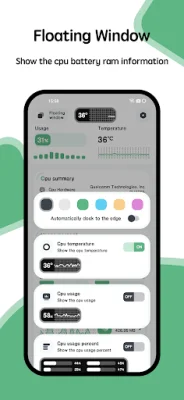
Latest Version
10.2.2
October 08, 2024
System monitor tools lab - Cpu Ram Battery
Tools
Android
0
$2.49
com.glgjing.marvel
Report a Problem
More About System Monitor Cpu Ram Battery
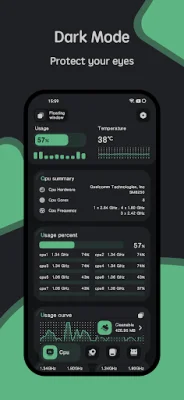
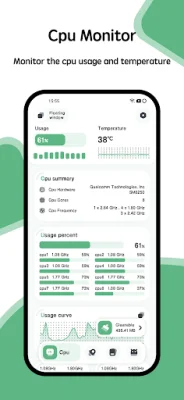
The CPU Monitor application is a useful tool for monitoring the performance of your device's central processing unit (CPU). It provides real-time information on the CPU temperature, frequency, activity, and usage, displayed in both a curve graph and a table. This allows users to easily track and analyze the history of their CPU's temperature and frequency. The application also supports monitoring of multicore CPUs, making it suitable for a wide range of devices. Overall, the CPU Monitor helps users keep an eye on their device's CPU usage and performance.
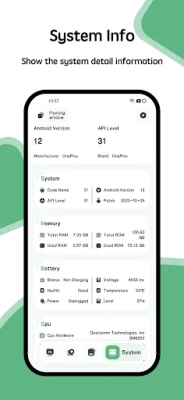
In addition to CPU monitoring, the application also provides detailed information about the device itself. This includes CPU information, system information, hardware information, and screen information. This allows users to have a comprehensive understanding of their device's specifications and capabilities.
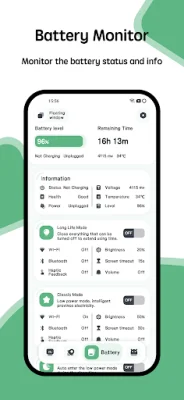
The Battery Monitor feature displays a curve graph of battery usage and temperature. It also provides information on the battery's health, power status, voltage, and level. This allows users to keep track of their battery's performance and make informed decisions about its usage.
The application also offers temperature overheating alarm and protection. This means that if the CPU or battery temperature reaches a dangerous level, the System Monitor will trigger an alarm. Users can choose to enable or disable this feature according to their preferences.
The CPU Monitor also offers a floating window that displays real-time information on the CPU and battery temperature, as well as RAM usage. This allows users to easily keep track of their device's performance while using other applications.
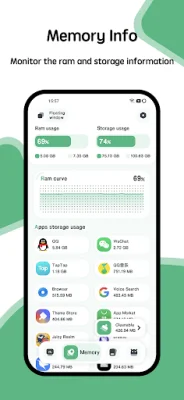
For added convenience, the application also offers widgets for RAM, CPU, and battery monitoring. This allows users to have quick access to important information without having to open the application.
Lastly, the Powerful System Monitor offers a variety of themes for users to choose from. This allows for a personalized and visually appealing experience. By purchasing the application, users can access all of these features at once. So why wait? Download the System Monitor now and take control of your device's performance.
Rate the App














Popular Apps









