
Wi-Fi Monitor+
1.6.8 by Andrey Efremov (0 Reviews) August 31, 2024

Latest Version
1.6.8
August 31, 2024
Andrey Efremov
Tools
Android
0
$2.49
ru.andr7e.wifimonitor.pro
Report a Problem
More About Wi-Fi Monitor+
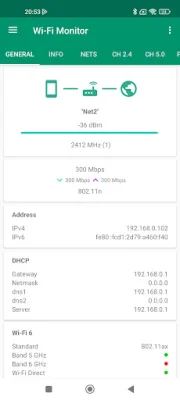
This application, version 1.6.5, provides information about Wi-Fi connections. To access the public IP address, simply click on the internet/earth icon. The app also includes a list of available Wi-Fi networks and allows for filtering of results. For Android 11+ and most routers, extra information such as model and vendor is available, including channels, country, streams, and extensions in the PRO version.
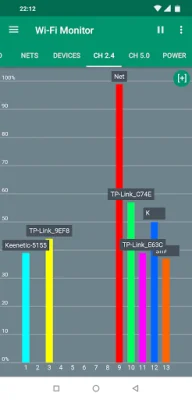
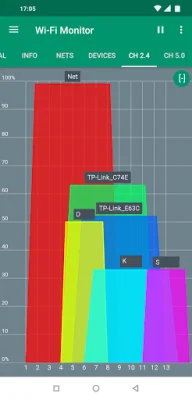
The app also features charts for available networks, grouped by channels for 2.4 or 5.0 GHz. Users can switch to a mode with channel width and pause updating. The app also supports scaling by fingers or maximizing by double tap.
In addition to Wi-Fi networks, the app also displays a chart with power for each network at a specific time interval. Users can also view a list of devices connected to their Wi-Fi network, with the option for a quick scan in the subnet a.b.c.x or a deep scan in the subnet a.b.x.x for Android 13 and lower. The app also attempts to detect the hostname and router model and allows for filtering of results. On Android 13+, the standard method for detecting devices is not available, so the app tries to find used IP addresses and users can increase the timeout by pressing the "..." button.
The app also utilizes Wi-Fi direct to scan for nearby devices with announcements, such as TVs and printers. In the menu options, users can get the vendor by MAC address. The app also includes a help section, which explains any restrictions for working with Wi-Fi on newer Android releases. For example, if the net list is not showing on a device with Android 6.0+, users should check that location permission is granted and that location is turned on. If the net name is not showing (unknown SSID), users may need to grant permission and turn on location for their device.
The PRO version of the app includes a light, dark, and black theme, with the option to choose which one to use. In the free version, the black theme is available for a 2-week trial. The app also allows users to generate reports with general information, nets, and devices, and choose what to include in the report. Reports can be saved in HTML or PDF format and opened or shared via email. The free version includes a 7-day trial for this feature and supports multiple reports, allowing users to choose previous reports to open or share. Users can also copy text by long pressing in the menu lists.
Finally, the app includes a tab for services in the network and supports development to improve the app. The minimum requirements for the app are Android 4.0.3 and above, and the following permissions are required: INTERNET for getting information about the connection, ACCESS_WIFI_STATE for information about Wi-Fi connections, CHANGE_WIFI_STATE for active network scans, ACCESS_COARSE_LOCATION for getting the list of available networks (for Android 6.0 and above), ACCESS_FINE_LOCATION for getting the list of available networks (for Android 10 and above), NEARBY_WIFI_DEVICES for getting the list of P2P devices (for Android 13 and above), and READ/WRITE EXTERNAL_STORAGE for reports and opening in a browser. The app also strives to be original and SEO-oriented.
Rate the App














Popular Apps









