

Netmonitor: Cell & WiFi Signal
by parizene (0 Reviews) August 24, 2024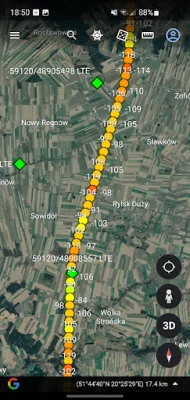
Latest Version
August 24, 2024
parizene
Tools
Android
0
Free
com.parizene.netmonitor
Report a Problem
More About Netmonitor: Cell & WiFi Signal
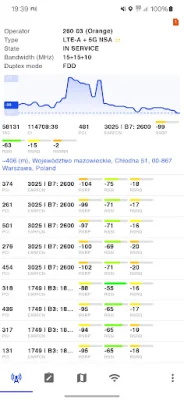
Netmonitor is a mobile application that provides users with advanced information about cellular networks, including 2G, 3G, 4G, and 5G (NSA and SA). It allows users to monitor the state of their cellular network by gathering data about cell towers. The app also has the ability to detect aggregated carriers, also known as LTE-Advanced. This makes it a useful tool for troubleshooting voice and data service quality, optimizing RF (Telecom), and conducting engineering field work.
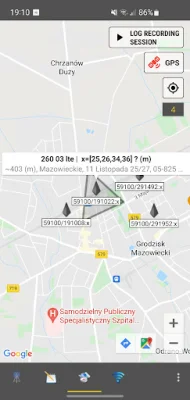
The precision of estimated cell tower positions is typically better for sites with three detected cells (sectors). If there is only one cell detected, it is not the cell tower position, but rather the center of the cell's serving area.
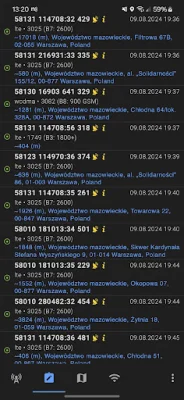
The app has a variety of features, including almost real-time monitoring of CDMA, GSM, WCDMA, UMTS, LTE, TD-SCDMA, and 5G NR networks. It also provides information about current and neighboring cell towers, such as MCC, MNC, LAC/TAC, CID/CI, RNC, PSC/PCI, channels, bandwidths, frequencies, and bands. Users can also visualize changes in DBM signal and receive network information in notifications. The app also supports multi-SIM devices and allows users to export sessions to CSV and KML, which can be viewed in Google Earth.
Netmonitor also has the ability to load external BTS antennas data, providing precise cell tower location information. It can collect data in the background and group cell tower sectors on a map. The app supports Google Maps and OSM, and can approximate cell tower locations with addresses based on geolocation services. It also has a cell finder and locator feature, allowing users to discover new cells in their area.
For users with Samsung or MIUI devices, the app has the ability to force LTE only (4G/5G) and lock LTE bands. However, this feature is not available on all phones and can only be accessed through the firmware hidden service menu.
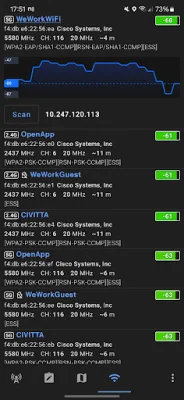
In addition to monitoring cellular networks, Netmonitor can also help diagnose problems in WiFi network setups. It can detect available WiFi networks and analyze network coverage, helping to increase signal strength and reduce traffic volume. The app can also assist in finding the best channel for a wireless router and identifying devices connected to the network.
The app provides a range of information about WiFi networks, including name (SSID) and identifier (BSSID), frequency, channel number, signal strength over time, router manufacturer, connection speed, estimated distance to the access point, IP address, subnet mask, gateway IP address, DHCP server address, DNS addresses, spectrum bands (2.4GHz, 5GHz, and 6GHz), channel width (20MHz, 40MHz, 80MHz, 160MHz, 80+80MHz), technologies (WiFi 1-6), and security options (WPA3, OWE, WPA2, WPA, WEP, 802.1x/EAP) and encryption (AES, TKIP).
The app requires certain permissions to access specific data, such as multi-SIM support, network type, service state, GPS location, and WiFi access points. For more information about the app, users can visit the website or contact the developer via email. There is also a Discord server available for users to join and ask questions.
Rate the App















Popular Apps









