

PingTools Network Utilities
4.64 Free by StreamSoft (0 Reviews) August 25, 2024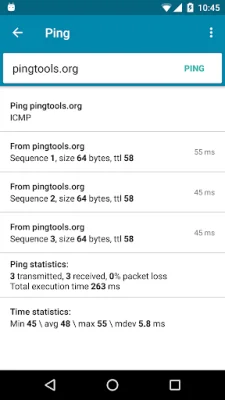
Latest Version
4.64 Free
August 25, 2024
StreamSoft
Tools
Android
0
Free
ua.com.streamsoft.pingtools
Report a Problem
More About PingTools Network Utilities
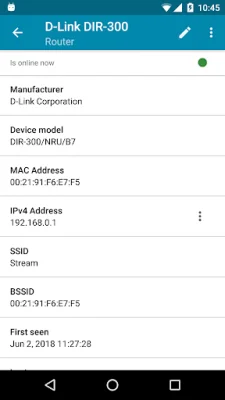
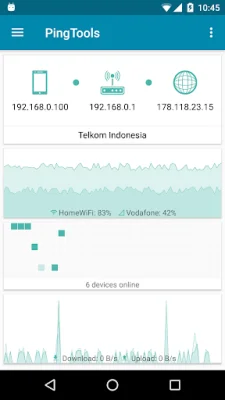
The Info application is a comprehensive tool that provides basic information about your device network. It allows you to monitor your network and its resources in real-time, ensuring that everything is running smoothly. With its continuous monitoring feature, you can stay on top of any potential issues and address them before they become major problems.
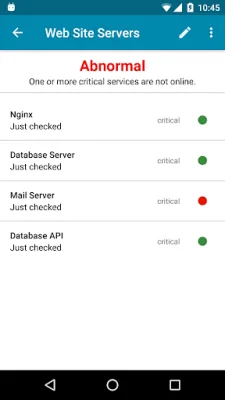
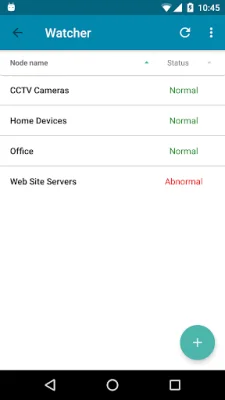
The Watcher feature is especially useful for businesses and organizations that rely heavily on remote resources. It allows you to keep a close eye on these resources and receive alerts if any issues arise. This ensures that your operations run smoothly and efficiently, without any unexpected interruptions.
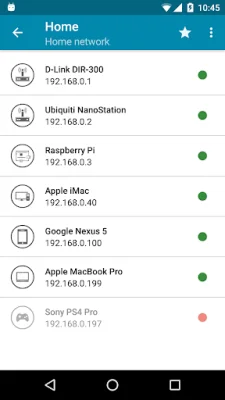
The Local-Area Network feature is a handy tool that displays all the devices connected to your network. This allows you to easily identify any unauthorized devices and ensure that your network is secure. It also helps you keep track of all the devices on your network and their respective IP addresses.
The Ping feature is a powerful tool that allows you to perform ICMP, TCP, and HTTP pings. This helps you check the availability and response time of various resources on your network. With this information, you can identify any potential bottlenecks and optimize your network for better performance.
The GeoPing feature takes things a step further by allowing you to check the availability of resources worldwide. This is especially useful for businesses with a global presence, as it helps them ensure that their resources are accessible from different locations.
The Traceroute feature is a useful tool for troubleshooting network issues. It allows you to trace the path of a packet and identify any potential issues along the way. This can help you pinpoint the source of a problem and resolve it quickly.
The iPerf tool is designed for network performance measurement and tuning. It allows you to measure the speed and throughput of your network, helping you identify any areas that need improvement. This can be especially useful for businesses that rely on a fast and reliable network for their operations.
The SpeedTest feature is based on iPerf and allows you to measure the speed of your network. This can be useful for both personal and business use, as it helps you ensure that your network is performing at its best.
The Port Scanner feature is a TCP port scanner that allows you to scan for open ports on your network. This can help you identify any potential security vulnerabilities and take necessary measures to protect your network.
The Whois feature allows you to look up information about a specific domain or IP address. This can be useful for businesses that want to gather more information about their competitors or potential partners.
The UPnP scanner is a tool for scanning UPnP and DLNA devices on your network. This can help you identify any devices that may be causing network congestion or security risks.
The Bonjour browser is a useful tool for Mac users, as it allows you to browse and connect to Bonjour services on your network. This can be especially useful for businesses that use Mac devices and rely on Bonjour for network services.
The Wi-Fi scanner is a handy tool for scanning and analyzing Wi-Fi networks in your area. This can be useful for personal use, as it helps you find the best Wi-Fi network to connect to. It can also be useful for businesses that want to ensure that their Wi-Fi network is secure and not being interfered with by other networks.
The Subnet scanner feature allows you to scan your network for all the devices within a specific subnet. This can be useful for identifying any unauthorized devices or potential security risks.
The DNS Lookup feature allows you to perform DNS lookups for a specific domain or IP address. This can be useful for troubleshooting network issues or gathering more information about a particular resource.
The Wake on LAN feature allows you to remotely wake up devices on your network. This can be useful for businesses that want to save energy by putting devices to sleep when not in use, but still need to access them remotely.
The IP Calculator feature is a handy tool for calculating various network parameters, such as subnet masks and IP addresses. This can be useful for network administrators and IT professionals who need to configure and manage their network.
With all these features and more, the Info application is a must-have for anyone looking to manage and optimize their device network. Its user-friendly interface and powerful tools make it a valuable asset for both personal and business use. So why wait? Download Info now and take control of your network today!
Rate the App















Popular Apps









