

Bulk Uninstaller
by Sakura Tech Studio (0 Reviews) April 18, 2026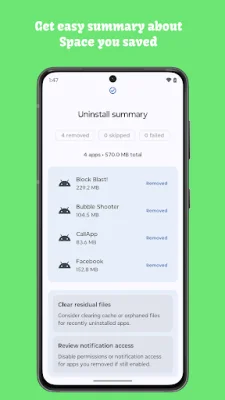
Latest Version
April 18, 2026
Sakura Tech Studio
Tools
Android
0
Free
com.bulkuninstaller.app
Report a Problem
More About Bulk Uninstaller
Bulk Installer is an application that allows users to quickly and easily uninstall multiple Android apps at once. It is designed for both power users and those who like to regularly clean up their device. With just a few taps, users can queue unwanted apps, track their progress, and reclaim storage without having to search through their device's settings.
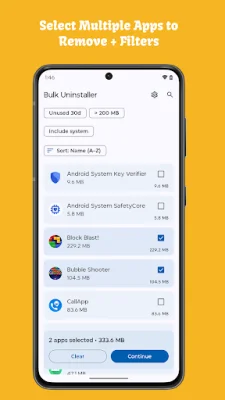
One of the main reasons users love Bulk Installer is because of its batch uninstall wizard. This feature allows users to select multiple apps and launch the system removal dialog in sequence, saving them from having to repeat the same steps over and over again. Additionally, the app offers smart filters and search options, making it easy to find unused apps, sort by size or install date, and identify hidden space hogs.
Bulk Installer also prioritizes privacy, with all analysis happening on the device itself. This means that no personal data is collected or uploaded. The app also provides a clear results dashboard, showing which apps were removed, skipped, or failed, and offering suggestions for what to clean next. And with its modern Material 3 design, the app is lightweight and fast, even for those with large app libraries.
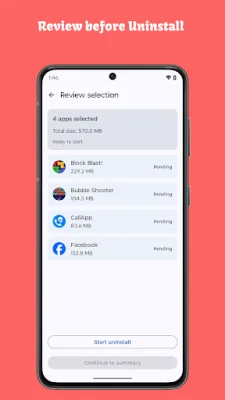
Some of the key features of Bulk Installer include a multi-select uninstall queue, usage filters to highlight unused apps, size-based sorting for freeing up storage, and an About & Settings hub with privacy policy and support information. The app also has a selection summary bar, showing the total number of apps and storage savings before the user confirms the uninstall.
Bulk Installer is perfect for a variety of users, including those who are migrating to new phones and want to clean up legacy installs, gamers who need to make room for new releases, productivity enthusiasts who like to keep their devices tidy, and anyone who is constantly battling "storage almost full" notifications.
One of the best things about Bulk Installer is that it respects the user's privacy. The app only reads package data that is already on the device and never sends any personal information anywhere. It also follows Android's required confirmation dialog for every uninstall, ensuring that the user is in control of what is being removed from their device.
To get started with Bulk Installer, simply download the app, scan your app list, and reclaim precious storage in just a few minutes. And if you enjoy using the app, be sure to rate it or share it with friends to help others enjoy a faster and cleaner Android experience.
Rate the App















Popular Apps









